

Pancard Online Apply Poster Related Poster Details
⚠️ Disclaimer: 🎯 Information is based on the details displayed in the provided poster.
👉 Document requirements may vary according to the applicable PAN application process and official requirements.
📢 Short Sharing (Hindi)
📄 पेनकार्ड आवेदन, सुधार और अपडेट से संबंधित जानकारी
📢 आवश्यक दस्तावेज़ों की जानकारी पोस्टर में दी गई है।
👉 www.yojnaportal.com
📢 Full Sharing (Hindi)
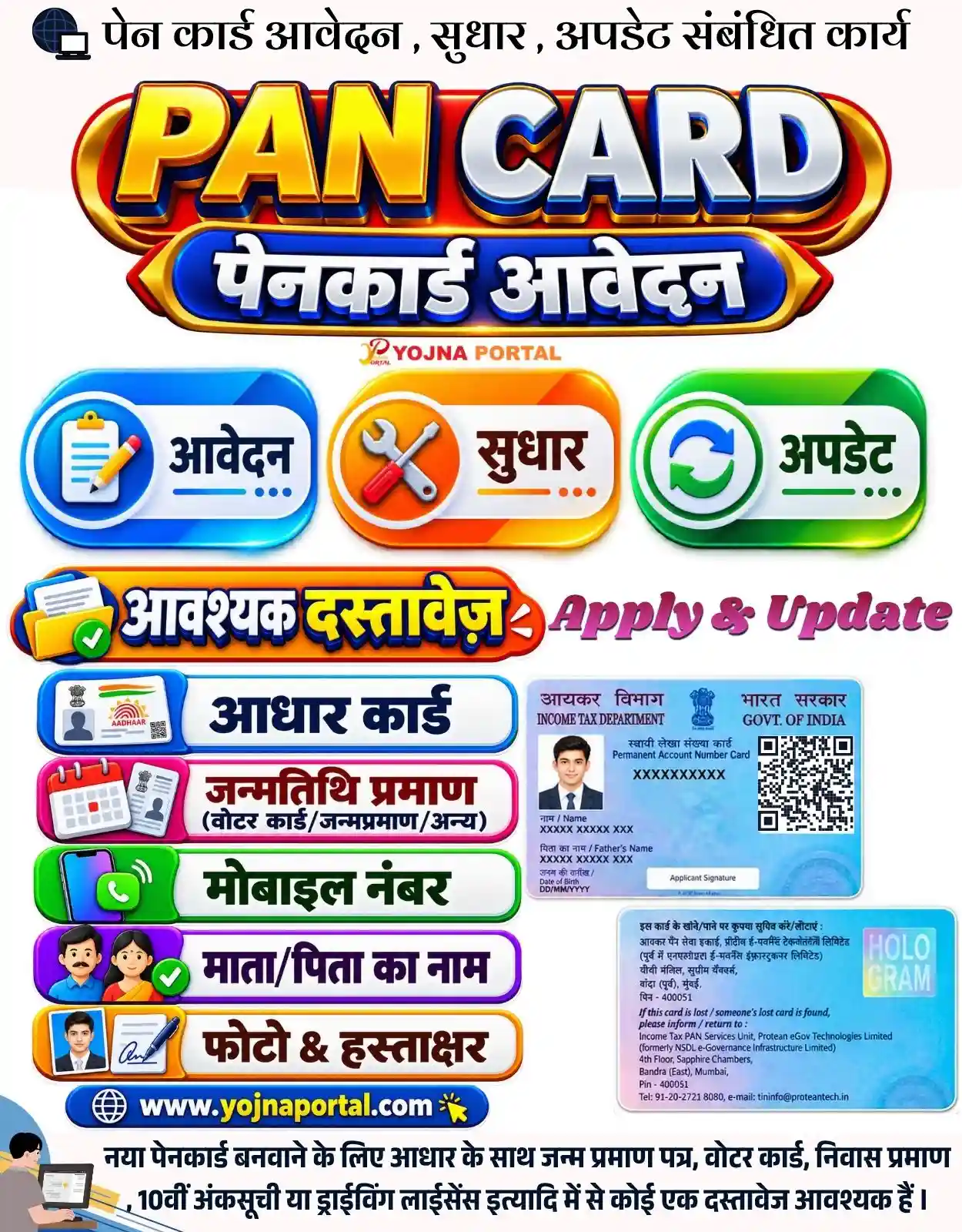
📄 पेनकार्ड आवेदन, सुधार और अपडेट

📢 आवश्यक जानकारी:
✔ आधार कार्ड
✔ जन्मतिथि प्रमाण — वोटर कार्ड/जन्मप्रमाण/अन्य
✔ मोबाइल नंबर
✔ माता/पिता का नाम
✔ फोटो एवं हस्ताक्षर

📌 नए पेनकार्ड के लिए आधार के साथ जन्म प्रमाण पत्र, वोटर कार्ड, निवास प्रमाण, 10वीं अंकसूची या ड्राइविंग लाइसेंस आदि में से कोई एक दस्तावेज आवश्यक है।

👉 अधिक जानें: www.yojnaportal.com

#PANCard #PancardApply #PancardCorrection #PancardUpdate #पेनकार्ड

🌅 आज का विचार:
"सही जानकारी और सही दस्तावेज़, किसी भी कार्य को आसान बना देते हैं।"
पेन कार्ड आवेदन, सुधार और अपडेट से संबंधित कार्य
✨Pancard Online Apply Poster Key Highlights
- PAN Card Application
- PAN Card Correction
- PAN Card Update
- Required Documents for PAN Card
📌 Important Details of Pancard Online Apply Poster
- Required document: Aadhaar Card
- Date of birth proof: Voter Card, Birth Certificate or other valid proof
- Mobile Number
- Mother/Father Name
- Photo and Signature
📖 About Pancard Online Apply Poster Poster
This poster explains PAN card application, correction and update-related services.
It highlights the documents and basic information required for PAN card application.
📢 Summary (Hindi)
क्या आप पेन कार्ड बनवाना चाहते हैं या उसमें सुधार और अपडेट करवाना चाहते हैं?

तो सबसे पहले जरूरी दस्तावेज़ों की जानकारी जान लीजिए।

पेन कार्ड के लिए आधार कार्ड, जन्मतिथि प्रमाण, मोबाइल नंबर, माता या पिता का नाम, फोटो और हस्ताक्षर जैसी जानकारी जरूरी है।

जन्मतिथि प्रमाण के लिए वोटर कार्ड, जन्म प्रमाण पत्र या अन्य दस्तावेज दिए जा सकते हैं।

नए पेनकार्ड के लिए आधार के साथ जन्म प्रमाण पत्र, वोटर कार्ड, निवास प्रमाण, दसवीं की अंकसूची या ड्राइविंग लाइसेंस आदि में से कोई एक दस्तावेज आवश्यक है।

आवेदन करने से पहले अपने सभी दस्तावेज तैयार रखें।

अधिक जानकारी के लिए विजिट करें www.yojnaportal.com
🧠 Pancard Online Apply Poster / Banner Generation Prompt
Create a highly detailed professional Indian government-information infographic poster, recreating the provided reference image as closely as possible in composition, hierarchy, proportions, typography, colors, spacing, icons, and visual style.

CANVAS:
Approximately 1000 × 1280 pixels, portrait 1:1.28 ratio. Clean high-resolution commercial graphic design. Predominantly white/off-white background with a polished social-media infographic appearance.

OVERALL LAYOUT:
Maintain the exact vertical structure of the reference. The design is centered and divided into clearly defined horizontal sections:

1. Top informational heading
2. Large PAN CARD 3D title
3. Blue/red Hindi application ribbon
4. Small Yojna Portal branding
5. Three colorful service cards
6. Required-document heading
7. Two-column document/card-information section
8. Website footer
9. Bottom explanatory Hindi sentence

TOP HEADING:
At the very top, place a small dark-blue globe/computer-style icon on the left, followed by the exact Hindi headline:
"पेन कार्ड आवेदन , सुधार , अपडेट संबंधित कार्य"
Use large, bold, black Hindi Devanagari typography with a traditional yet modern government-information style. Keep the entire heading on one horizontal line and centered across the upper area. Preserve the visible spacing around the commas exactly as shown.

MAIN PAN CARD TITLE:
Directly below the top heading, place a large premium 3D horizontal emblem.
Use a glossy deep-red rounded capsule/ribbon with thick golden metallic edging and subtle dark-blue outer shadow.
Inside it, place enormous bold 3D English text:
"PAN CARD"
"PAN" should use a brilliant golden-yellow metallic gradient.
"CARD" should use a silver-white metallic gradient.
Both words must have thick dark-blue/black extrusion, polished bevels, bright highlights, realistic depth, and subtle gold accents.
The letters should dominate the upper-center portion exactly like the reference.

HINDI APPLICATION RIBBON:
Immediately underneath the PAN CARD title, place a smaller curved glossy royal-blue ribbon with gold edging, red/gold pointed decorative ends, and a strong 3D embossed appearance.
Render the exact Hindi text:
"पेनकार्ड आवेदन"
Use very bold white/silver Devanagari lettering with dark-blue extrusion, bevel, shadow, and high contrast.
Center the text perfectly inside the ribbon.

BRANDING:
Below the Hindi ribbon, place the small centered branding:
"YOJNA PORTAL"
with the compact red/orange portal-style logo mark above/near the lettering, matching the reference.
Keep this branding small and subordinate to the main PAN CARD title.

THREE SERVICE CARDS:
Create three equal-width rounded rectangular glossy cards in one horizontal row below the branding, with consistent spacing.

LEFT CARD:
Bright blue/cyan gradient rounded card with glossy highlights and soft shadow.
On the left side, place a circular white icon area containing a clipboard/document and pencil illustration.
On the right side, render the exact Hindi text:
"आवेदन"
Use bold dark navy Devanagari typography.

CENTER CARD:
Orange/yellow gradient rounded card with glossy highlights and soft shadow.
Place a circular white icon area containing crossed tools/wrench-and-screwdriver imagery.
On the right side, render:
"सुधार"
Use bold dark brown/navy Devanagari typography.

RIGHT CARD:
Bright green gradient rounded card with glossy highlights and soft shadow.
Place a circular white icon area containing a circular refresh/update symbol.
On the right side, render:
"अपडेट"
Use bold dark green Devanagari typography.

REQUIRED DOCUMENTS SECTION:
Below the three service cards, create a prominent horizontal orange/red glossy title ribbon.
On the left, include a folder/document/checkmark icon.
Inside the ribbon, render the exact Hindi text:
"आवश्यक दस्तावेज़"
Use bold white and yellow Devanagari 3D lettering with dark-blue outline and extrusion.

To the right of this heading, place the exact English decorative text:
"Apply & Update"
in large italic magenta/purple lettering, visually aligned with the document heading.

MAIN DOCUMENT INFORMATION AREA:
Below the required-document heading, create a two-column layout.

LEFT COLUMN:
Stack five rounded horizontal document cards with colorful borders and corresponding icons on the left.

Card 1:
Blue border/background accents, Aadhaar-card icon on the left.
Exact text:
"आधार कार्ड"
Use bold dark navy Hindi lettering.

Card 2:
Pink/magenta border accents with calendar and identity-document icon.
Exact text:
"जन्मतिथि प्रमाण"
Under it, in a smaller bold line:
"(वोटर कार्ड/जन्मप्रमाण/अन्य)"
Maintain the two-line structure.

Card 3:
Green border accents with smartphone and phone-call icon.
Exact text:
"मोबाइल नंबर"

Card 4:
Purple border accents with illustrated father-and-mother/family icon and green verification check.
Exact text:
"माता/पिता का नाम"

Card 5:
Orange/yellow border accents with portrait-photo and signature/pen illustration.
Exact text:
"फोटो & हस्ताक्षर"

Each card must have rounded corners, white inner background, soft realistic shadow, thick colorful outer border, and a large relevant icon occupying the left portion. Text should be horizontally aligned and vertically centered.

RIGHT COLUMN — PAN CARD REFERENCE:
Place two PAN card reference images vertically, occupying the right side.

UPPER CARD:
Show the front side of a modern Indian PAN card based closely on the supplied reference.
Use a light blue/cyan security-print background.
Include visible Indian government styling, the Ashoka emblem, bilingual Income Tax Department/Government of India heading, applicant photograph area, PAN number area, name, father's name, date of birth, applicant signature, and a large QR code on the right.
Preserve the visual appearance of a contemporary PAN card with realistic security-print texture.
Do not invent prominent readable personal information; use masked placeholder-style values if necessary.

LOWER CARD:
Show the back side of the same PAN card.
Use the same light-blue security-print appearance.
Include the visible informational text blocks, address/contact section, and prominent hologram area on the right, matching the supplied reference.
Maintain the same proportions and positioning as the reference.

WEBSITE FOOTER:
Below the document/card section, place a compact glossy royal-blue rounded pill.
Inside it, include a white globe icon followed by the exact website:
"[www.yojnaportal.com](http://www.yojnaportal.com)"
Use bold white and yellow typography, with a small yellow cursor/click icon toward the right.
Keep it centered horizontally.

BOTTOM EXPLANATORY TEXT:
At the very bottom, place the exact Hindi explanatory sentence in bold black Devanagari typography, centered and arranged across multiple lines exactly as naturally required by the available width:

"नया पेनकार्ड बनवाने के लिए आधार के साथ जन्म प्रमाण पत्र, वोटर कार्ड, निवास प्रमाण
, 10वीं अंकसूची या ड्राइविंग लाइसेंस इत्यादि में से कोई एक दस्तावेज आवश्यक हैं।"

Maintain the reference's compact bold government-notice appearance.

BACKGROUND:
Pure clean white/off-white background. No scenery, no photographs outside the PAN-card references, no decorative background pattern, no unrelated objects. Use only subtle shadows beneath cards and ribbons to create depth.

VISUAL STYLE:
Premium Indian government-information social-media poster.
Glossy 3D UI-card aesthetic.
Bright blue, orange, green, pink, purple, red, gold, white and navy palette.
Strong rounded geometry.
Thick outlines.
Soft realistic drop shadows.
Glossy highlights.
Clean vector-like contours.
High contrast.
Professional Hindi typography.
Highly polished commercial infographic finish.

TYPOGRAPHY:
Use highly legible bold Devanagari fonts for Hindi text, with accurate matras and character forms.
English text should use bold modern sans-serif fonts, except "Apply & Update", which should use bold italic decorative lettering.
Maintain exact spelling and wording.
Do not introduce any additional slogans, captions, numbers, logos, icons, or text not present in the reference.

COMPOSITION ACCURACY:
Preserve the exact visual hierarchy, relative sizes, alignment, card spacing, left-right balance, margins, and vertical proportions of the supplied reference.
The PAN CARD title should remain the dominant visual element.
The three service cards must remain in one row.
The required documents list must remain on the left and PAN card references on the right.
The website must remain centered below the document section.
The final Hindi explanatory statement must remain at the bottom.

OUTPUT:
High-resolution, razor-sharp, print-quality infographic, approximately 1000×1280 px, clean edges, realistic 3D depth, professional lighting, polished reflections, accurate Hindi typography, and faithful recreation of the supplied reference image.
WhatsApp Telegram YouTube Facebook Instagram X (Twitter)