
Pan Card Apply Related Poster Details
यह पोस्टर केवल सामान्य जानकारी प्रदान करने के उद्देश्य से बनाया गया है।
हम यह सुनिश्चित नहीं करते कि ऊपर दी गई सभी जानकारी पूर्णतः सही, सटीक एवं समयानुसार अपडेट हो।
संबंधित विभाग समय-समय पर अपनी आधिकारिक वेबसाइट पर जानकारी में बदलाव कर सकते हैं।
यह वेबसाइट किसी भी सरकारी विभाग, बैंक, संस्था या संगठन की आधिकारिक वेबसाइट नहीं है।
सभी योजनाओं, लोगो, नाम एवं ट्रेडमार्क का अधिकार उनके संबंधित विभागों एवं संस्थाओं के पास सुरक्षित है।
किसी भी आवेदन, पंजीयन या सेवा का लाभ लेने से पहले संबंधित विभाग की आधिकारिक वेबसाइट या कार्यालय से जानकारी अवश्य सत्यापित करें।
📢 Short Sharing (Hindi)
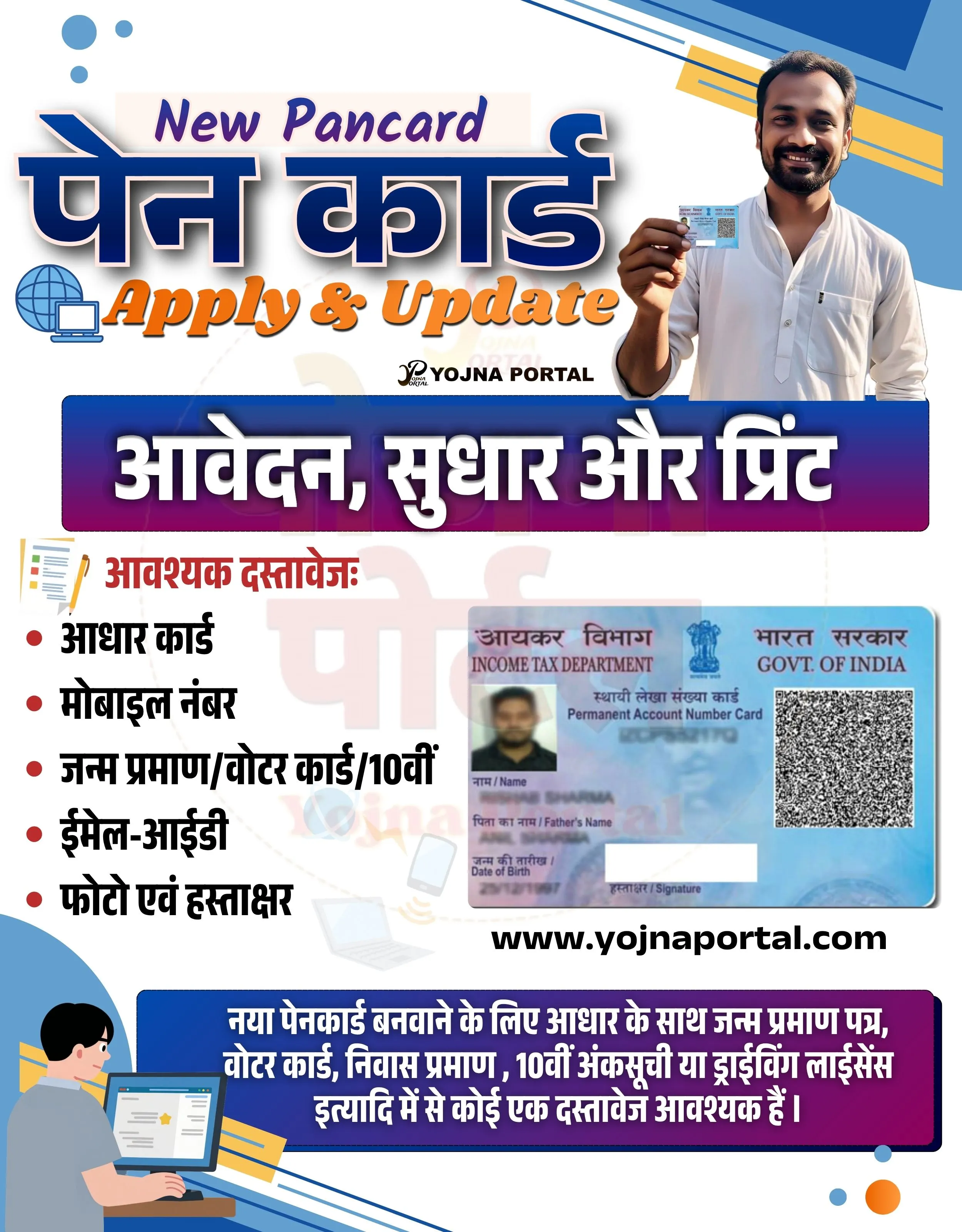
🚨 पैन कार्ड आवेदन शुरू
💰 नया, सुधार और प्रिंट सुविधा उपलब्ध
📢 अभी ऑनलाइन आवेदन करें
👉 www.yojnaportal.com
📢 Full Sharing (Hindi)
🚨 पैन कार्ड बनवाना हुआ आसान!

💰 नया पैन कार्ड आवेदन, सुधार और प्रिंट सुविधा उपलब्ध
📢 बैंकिंग और फायनेसियल जैसी सेवाओं के लिए आवश्यक

📄 आवश्यक दस्तावेज:
✔ आधार कार्ड
✔ मोबाइल नंबर
✔ जन्म प्रमाण / 10वीं मार्कशीट
✔ ईमेल आईडी
✔ फोटो एवं हस्ताक्षर

👉 अधिक जानकारी: www.yojnaportal.com

#PANCard #OnlineApply #YojnaPortal
✨Pan Card Apply Key Highlights
- Apply for new PAN card online
- Update or correct existing PAN details
- Print PAN card easily
- Quick and simple documentation process
📌 Important Details of Pan Card Apply
- Aadhaar Card is required
- Mobile number must be active
- Valid birth proof or 10th certificate needed
- Email ID, photo, and signature required
📖 About Pan Card Apply Poster
This poster provides information about applying for a new PAN card and updating existing PAN details.
It also explains required documents and highlights easy steps for application and printing services.
🧠 Pan Card Apply / Banner Generation Prompt
Create a vertical government-style promotional banner (approx. 1000x1280 px) with a clean, modern, and semi-corporate Indian service design.

BACKGROUND:
Use a light grey to off-white gradient background with subtle abstract shapes. Add soft blue curved shapes and diagonal design accents in the top-right and bottom-left corners. Include small circular and dotted decorative elements in blue and orange scattered lightly across the background.

TOP SECTION:
At the top-left, place the English text "New Pancard" in a stylish italic or script-like font in purple color.
Below it, add a large bold Hindi title "पैन कार्ड" in dark blue with a thick white outline and slight drop shadow for depth.
Under this, include the text "Apply & Update" in bold orange gradient font with a slight 3D or shadow effect.
Near this heading area, place a small laptop icon (blue-themed) to the left side.

TOP-RIGHT HUMAN ELEMENT:
On the right side, place a smiling Indian man (young adult, wearing a white kurta) holding a PAN card toward the camera. The image should be well-lit, cutout style with soft shadow, placed overlapping the background but not blocking text.

CENTER STRIP:
Add a wide horizontal banner strip in the center with a gradient from deep purple to magenta.
Inside this strip, write bold white Hindi text:
"आवेदन, सुधार और प्रिंट"
The text should be centered and large, with strong contrast.

LEFT CONTENT SECTION:
Below the strip on the left side, create a bullet list with a heading in red:
"आवश्यक दस्तावेज:"
Under it, list items with red bullet points and black Hindi text:

आधार कार्ड
मोबाइल नंबर
जन्म प्रमाण/वोटर कार्ड/10वीं
ईमेल-आईडी
फोटो एवं हस्ताक्षर

RIGHT CONTENT SECTION:
On the right side of this list, place a realistic PAN card graphic (Indian PAN card design), slightly tilted or flat, with visible QR code and government emblem.

CENTER FOOTER TEXT:
Below the PAN card, add the website text in bold black:
"www.yojnaportal.com
"

BOTTOM SECTION:
At the bottom, create a rounded rectangular banner with a purple-to-pink gradient.
Inside, write Hindi text in white:
"नया पैनकार्ड बनवाने के लिए आधार के साथ जन्म प्रमाण पत्र, वोटर कार्ड, निवास प्रमाण, 10वीं अंकसूची या ड्राइविंग लाइसेंस इनमें से कोई एक दस्तावेज आवश्यक है।"

BOTTOM-LEFT ILLUSTRATION:
Include a small flat illustration of a person sitting and working on a laptop (cartoon style), placed in the bottom-left corner.

DESIGN STYLE:
Use modern सरकारी service poster style with bold typography, clean spacing, and layered card-like layout.
Ensure proper alignment: left content + right image balance.
Use shadows and highlights subtly for depth.

COLOR PALETTE:
Primary colors: Blue (#1f4fa3), Purple (#6a1b9a), Magenta (#d81b60), Orange (#ff7a00)
Text colors: White, Black, Red accents
Background: Light grey/white gradient

TYPOGRAPHY:
Mix of bold Hindi display fonts and clean sans-serif English fonts.
Use large headings, medium subheadings, and clear readable body text.

Ensure all text remains exactly as written in Hindi and English, preserving placement and hierarchy.
WhatsApp Telegram YouTube Facebook Instagram X (Twitter)