
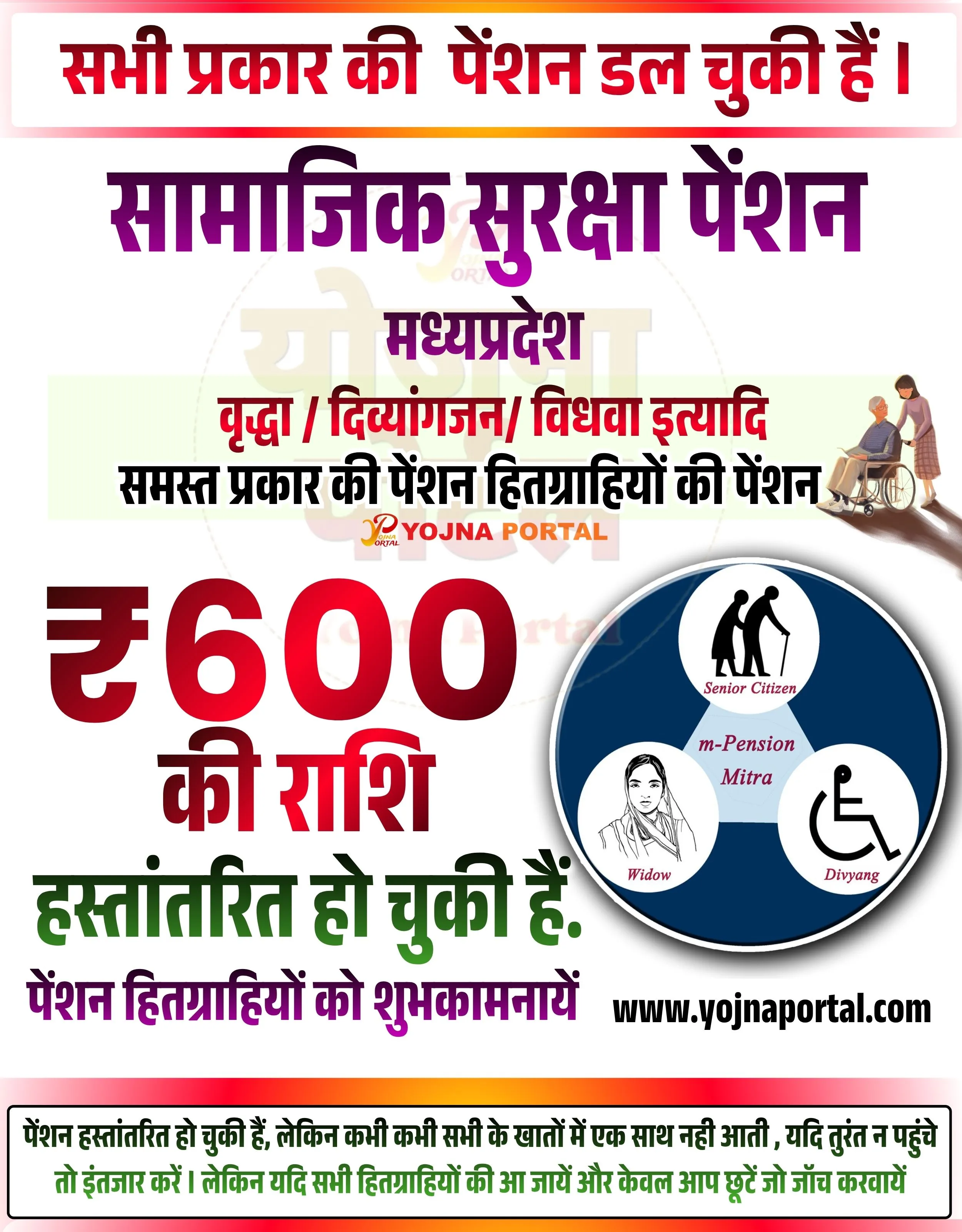
All Types of Pensions Have Been Released
Social Security Pension – Madhya Pradesh for Elderly, Disabled and Widows

MP Social Security Pension Update Related Poster Details
⚠️ Disclaimer:
यह पोस्टर केवल सामान्य जानकारी प्रदान करने के उद्देश्य से बनाया गया है।
हम यह सुनिश्चित नहीं करते कि ऊपर दी गई सभी जानकारी पूर्णतः सही, सटीक एवं समयानुसार अपडेट हो।
संबंधित विभाग समय-समय पर अपनी आधिकारिक वेबसाइट पर जानकारी में बदलाव कर सकते हैं।
यह वेबसाइट किसी भी सरकारी विभाग, बैंक, संस्था या संगठन की आधिकारिक वेबसाइट नहीं है।
सभी योजनाओं, लोगो, नाम एवं ट्रेडमार्क का अधिकार उनके संबंधित विभागों एवं संस्थाओं के पास सुरक्षित है।
किसी भी आवेदन, पंजीयन या सेवा का लाभ लेने से पहले संबंधित विभाग की आधिकारिक वेबसाइट या कार्यालय से जानकारी अवश्य सत्यापित करें।
🧠 MP Social Security Pension Update / Banner Generation Prompt
Design a highly detailed Indian government-style informational poster in vertical format (approx. 1000x1280).

BACKGROUND:
Use a clean light grey to white gradient background with a very subtle watermark text “YOJNA PORTAL” faintly visible in the center. Add a soft outer border with a red-to-orange gradient glow effect around all edges.

TOP SECTION:
At the very top, create a rounded rectangular banner strip with a light grey background and a bold red border.
Inside it, place bold Hindi text in bright red color:
“सभी प्रकार की पेंशन डल चुकी हैं।”
Font style should be bold, सरकारी style, large and centered.

MIDDLE MAIN HEADING:
Below the top strip, add a large bold Hindi title in deep purple color:
“सामाजिक सुरक्षा पेंशन”
Centered and very prominent.

Below it, add smaller bold text in dark purple:
“मध्यप्रदेश”

Next line in bold red:
“वृद्ध / दिव्यांगजन / विधवा इत्यादि”

Below that, add black bold text:
“समस्त प्रकार की पेंशन हितग्राहियों की पेंशन”

Slightly behind this middle section, include a faint circular watermark graphic (low opacity) to give depth.

RIGHT SIDE ILLUSTRATION:
On the right side, place a soft illustration of an elderly man sitting in a wheelchair and a woman standing beside him assisting. The illustration should be semi-realistic, clean, and soft colored.

CENTER LOWER SECTION:
Add branding text “YOJNA PORTAL” in orange-red color with a small logo style appearance, centered but subtle.

MAIN AMOUNT SECTION:
Create a large bold numeric highlight on the left side:
“₹600” in very large red gradient font (dark red to bright red).
Below it, in bold Hindi text:
“की राशि” (red color)

Below that, in green bold text:
“हस्तांतरित हो चुकी हैं.”

BOTTOM LEFT TEXT:
Add purple bold text:
“पेंशन हितग्राहियों को शुभकामनायें”

RIGHT SIDE ICON CIRCLE:
On the bottom-right side, create a circular infographic with a dark blue background.
Inside it, divide into 3 sections/icons:
Top: Senior Citizen icon with text “Senior Citizen”
Left: Widow illustration with text “Widow”
Right: Divyang icon (wheelchair symbol) with text “Divyang”
Center text: “m-Pension Mitra”

WEBSITE:
Below the circle, add bold black text:
“www.yojnaportal.com”

BOTTOM DISCLAIMER STRIP:
At the very bottom, add a full-width light grey rounded rectangle with a thin border.
Inside, place small Hindi text in black/green:
“पेंशन हस्तांतरित हो चुकी हैं, लेकिन कभी कभी सभी के खातों में एक साथ नहीं आती , यदि तुरंत न पहुंचे तो इंतजार करें। लेकिन यदि सभी हितग्राहियों की आ जायें और केवल आप छूटें तो जांच करवायें”

TYPOGRAPHY:
Use bold, clean, government-style Hindi fonts.
Maintain hierarchy with large headings, medium subheadings, and smaller footer text.

COLOR PALETTE:
Red (#d32f2f), Purple (#6a1b9a), Green (#2e7d32), Black, White, Light Grey background.
Use strong contrast for readability.

LAYOUT:
Center-aligned main content, with right-side illustration and bottom-right circular infographic.
Balanced spacing, clean margins, professional सरकारी poster design.

LIGHTING & EFFECTS:
Soft shadows under text and circular graphic.
Subtle depth with gradients and watermark.
No harsh lighting, keep flat modern government poster look.
WhatsApp Telegram YouTube Facebook Instagram X (Twitter)