
Mp Rojgar Panjiyan Related Poster Details
⚠️ Disclaimer:
यह पोस्टर केवल सामान्य जानकारी प्रदान करने के उद्देश्य से बनाया गया है।
हम यह सुनिश्चित नहीं करते कि ऊपर दी गई सभी जानकारी पूर्णतः सही, सटीक एवं समयानुसार अपडेट हो।
संबंधित विभाग समय-समय पर अपनी आधिकारिक वेबसाइट पर जानकारी में बदलाव कर सकते हैं।
यह वेबसाइट किसी भी सरकारी विभाग, बैंक, संस्था या संगठन की आधिकारिक वेबसाइट नहीं है।
सभी योजनाओं, लोगो, नाम एवं ट्रेडमार्क का अधिकार उनके संबंधित विभागों एवं संस्थाओं के पास सुरक्षित है।
किसी भी आवेदन, पंजीयन या सेवा का लाभ लेने से पहले संबंधित विभाग की आधिकारिक वेबसाइट या कार्यालय से जानकारी अवश्य सत्यापित करें।
🧠 Mp Rojgar Panjiyan / Banner Generation Prompt
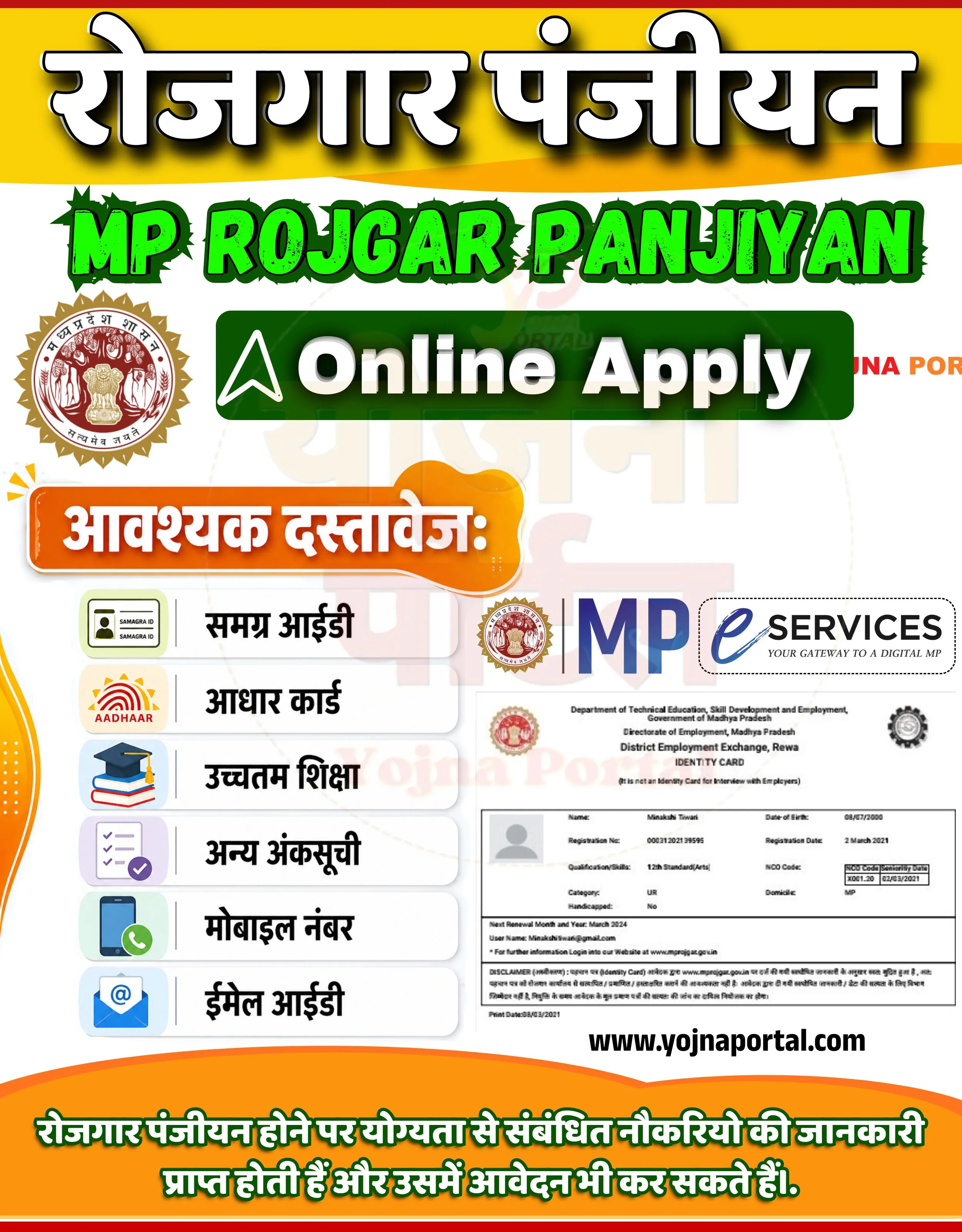
Design a highly detailed Indian government-style informational banner/poster in vertical format (approx. 1000x1280).

BACKGROUND:
Use a clean light grey to off-white background. Add a very subtle circular watermark in the center reading “Yojna Portal” in faint opacity. At the very top, include a thick horizontal band with a warm yellow-orange gradient. Beneath it, create a smooth curved transition into the main white area.

TOP SECTION:
Center-aligned large bold Hindi text in white with thick black shadow:
“रोजगार पंजीयन”
Font style should be heavy, सरकारी style, slightly rounded, with strong drop shadow for depth.

Below it, place a bold stylized green title in English:
“MP ROJGAR PANJIYAN”
Use a grunge/brush-style bold font with dark outline and shadow for a 3D effect.

Below that, add a dark green rounded rectangle button with gradient and glossy effect:
Inside text: “Online Apply” in white bold modern font
Left side of button: a white paper-plane/send icon.

LEFT SIDE (MID SECTION):
Place Madhya Pradesh government emblem/logo (circular seal style) near the top-left of the middle section.

Below it, add an orange rounded label/banner with white Hindi text:
“आवश्यक दस्तावेज:”
The label should have a soft shadow and slightly glossy highlight.

Under this, create a vertical list of document items inside light grey rounded boxes:
Each item should have a left-aligned icon and right-aligned Hindi text:

Icon: ID card → Text: “समग्र आईडी”
Icon: Aadhaar logo → Text: “आधार कार्ड”
Icon: Graduation cap/books → Text: “उच्चतम शिक्षा”
Icon: checklist → Text: “अन्य अंकसूची”
Icon: mobile phone → Text: “मोबाइल नंबर”
Icon: email/envelope → Text: “ईमेल आईडी”

Each box should have soft shadow, equal spacing, and aligned neatly.

RIGHT SIDE (MID SECTION):
Place “MP eServices” logo with tagline “YOUR GATEWAY TO A DIGITAL MP”

Below it, include a realistic card-style sample of an Employment Registration Card:

Header text:
“Department of Technical Education, Skill Development and Employment, Government of Madhya Pradesh”
“Directorate of Employment, Madhya Pradesh”
“District Employment Exchange, Rewa”
“IDENTITY CARD”
Include placeholder details like:
Name, Date of Birth, Registration No., Qualification, Category, etc.
Add a small profile icon box on left
Use light grey borders and official card layout styling

BOTTOM SECTION:
Add website text centered:
“www.yojnaportal.com”
 in bold black font

Below, create a curved orange footer section with gradient.

Inside footer, place Hindi informational text in white bold font:
“रोजगार पंजीयन होने पर योग्यता से संबंधित नौकरियों की जानकारी प्राप्त होती हैं और उसमें आवेदन भी कर सकते हैं।”

STYLE & DESIGN:

Use strong contrast: yellow/orange header, green highlights, white base
Typography: bold, सरकारी, highly readable
Add soft shadows for all major elements
Maintain clean spacing and alignment
No extra elements beyond described content
Ensure layout is left-content + right-card balanced structure
WhatsApp Telegram YouTube Facebook Instagram X (Twitter)