
Distribution and Agricultural Fertilizer Supply Solution
E-Token Generation through the E-Vikas System
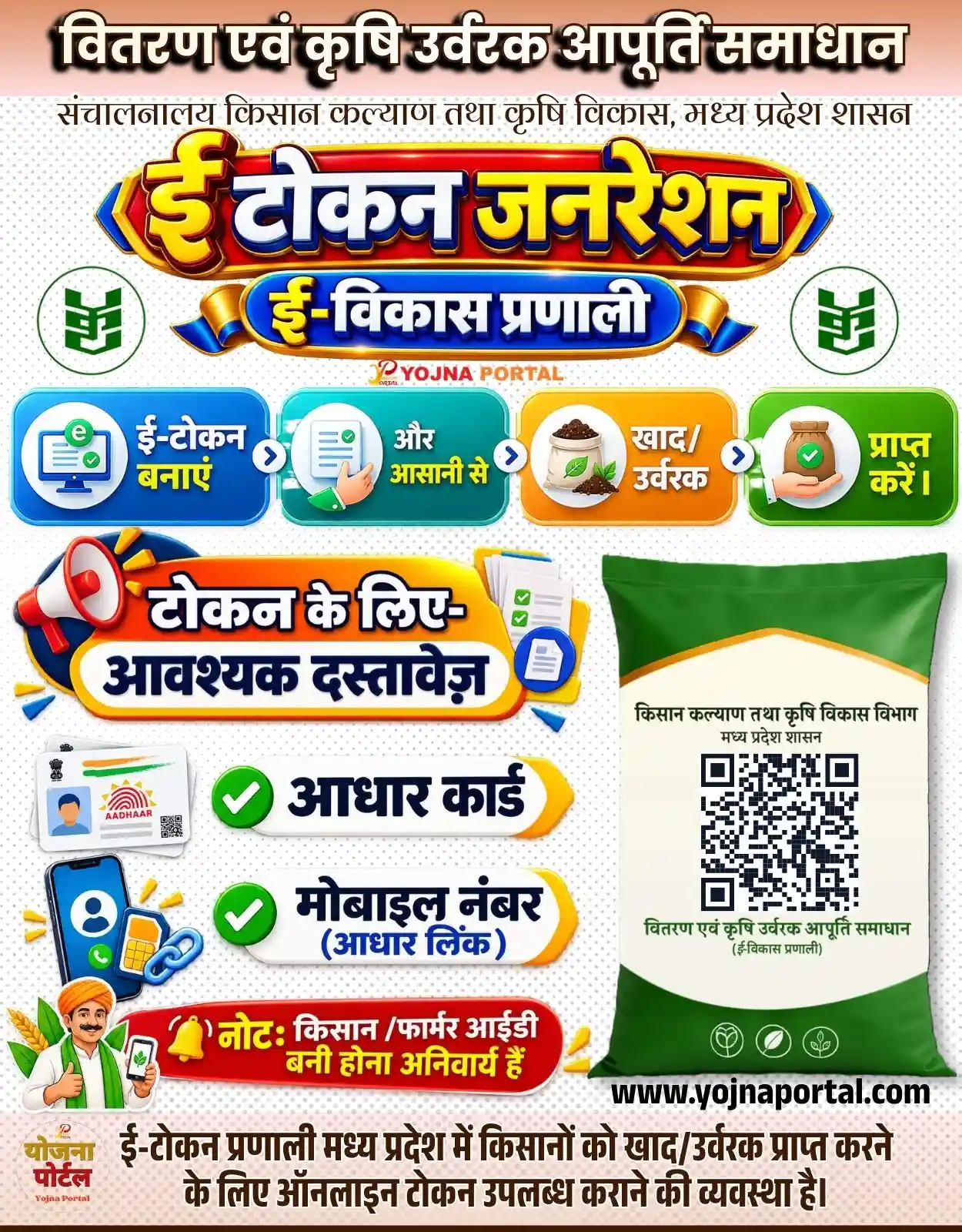

Mp E Tokan E Viakas Related Poster Details
⚠️ Disclaimer: 🎯 This information is extracted from the provided government-related poster.
👉 For official information and service details, verify the latest instructions through the concerned government department or official portal.
📢 Short Sharing (Hindi)
🌾 ई-टोकन जनरेशन
👉 खाद/उर्वरक प्राप्त करने के लिए ऑनलाइन ई-टोकन बनाएं।
📢 किसान/फार्मर आईडी बनी होना अनिवार्य है।
👉 www.yojnaportal.com
📢 Full Sharing (Hindi)
🌾 ई-टोकन जनरेशन – मध्य प्रदेश

💰 खाद/उर्वरक प्राप्त करने के लिए किसान ऑनलाइन ई-टोकन बना सकते हैं।

📢 महत्वपूर्ण जानकारी:
✔ ई-टोकन ऑनलाइन बनाएं
✔ आधार कार्ड आवश्यक
✔ आधार लिंक मोबाइल नंबर आवश्यक
✔ किसान/फार्मर आईडी बनी होना अनिवार्य

📄 आवश्यक दस्तावेज:
✔ आधार कार्ड
✔ आधार लिंक मोबाइल नंबर
✔ किसान/फार्मर आईडी

👉 अधिक जानें: www.yojnaportal.com

#ईटोकन #ईविकासप्रणाली #कृषिउर्वरक #खाद #किसान #मध्यप्रदेश #MPNews
Generate an E-Token and easily receive fertilizer.
✨Mp E Tokan E Viakas Key Highlights
- Online E-Token generation facility for farmers in Madhya Pradesh
- E-Vikas System for fertilizer distribution and supply
- Easy process to obtain fertilizer through an online token
- Farmer/Farmer ID is mandatory for E-Token generation
📌 Important Details of Mp E Tokan E Viakas
- Aadhaar Card is required
- Mobile number linked with Aadhaar is required
- Farmer/Farmer ID must already be created
- Use the E-Vikas System to generate an online E-Token for fertilizer
📖 About Mp E Tokan E Viakas Poster
This poster provides information about the Madhya Pradesh E-Token Generation and E-Vikas System for fertilizer distribution.
The service is associated with the Directorate of Farmer Welfare and Agriculture Development, Government of Madhya Pradesh.
📢 Summary (Hindi)
किसानों के लिए खाद और उर्वरक प्राप्त करना अब और आसान हो गया है!

मध्य प्रदेश में ई-विकास प्रणाली के माध्यम से ऑनलाइन ई-टोकन जनरेशन की सुविधा उपलब्ध है। किसान ई-टोकन बनाकर आसानी से खाद और उर्वरक प्राप्त कर सकते हैं।

ई-टोकन बनाने के लिए आधार कार्ड और आधार लिंक मोबाइल नंबर जरूरी है। साथ ही किसान या फार्मर आईडी बनी होना अनिवार्य है।

इस सुविधा का लाभ लेने के लिए जरूरी जानकारी ध्यान से देखें और ऑनलाइन ई-टोकन बनाएं।

ऐसी ही महत्वपूर्ण किसान और सरकारी योजना की जानकारी के लिए विजिट करें www.yojnaportal.com
🧠 Mp E Tokan E Viakas / Banner Generation Prompt
Create an extremely accurate, high-resolution recreation of the provided vertical Indian government information poster, maintaining the same overall composition, proportions, visual hierarchy, typography, colors, objects, illustrations, icons, spacing, and text placement. Canvas approximately 1000x1280 px, portrait orientation.

BACKGROUND:
Use a clean white/off-white background with a subtle repeating light-gray dotted halftone pattern across the main body. At the very top, add a soft peach-to-light-pink horizontal gradient band. The overall poster should have a bright, polished Indian government awareness-campaign aesthetic with strong 3D typography, glossy colored panels, rounded shapes, thick outlines, realistic shadows, and highly saturated blue, yellow, red, orange, and green accents.

TOP HEADER:
At the top center, place the large Hindi headline:
"वितरण एवं कृषि उर्वरक आपूर्ति समाधान"
Use very bold Devanagari display typography, black/dark charcoal letters with a thick cream/white inner outline and heavy black drop shadow, giving the text a raised 3D appearance. Keep it centered and spanning almost the full width.

Immediately below, place the smaller Hindi government department line:
"संचालनालय किसान कल्याण तथा कृषि विकास, मध्य प्रदेश शासन"
Use an elegant dark-gray Devanagari font, centered, with generous spacing.

MAIN LOGO AREA:
Below the department line, create a large glossy central emblem/logo occupying the upper-middle portion. The primary logo reads:
"ई-टोकन जनरेशन"
with "ई" oversized on the left and the remaining Hindi lettering extending horizontally.

The logo should look like a premium 3D metallic sign:

Deep red central glossy background
Thick golden-yellow outer frame
Bright blue side accents
White, dark-blue, yellow, and orange dimensional Hindi lettering
Strong beveling, highlights, reflections, and black shadows
Symmetrical pointed blue-and-gold decorative ends on both sides

Directly below the main logo, add a smaller blue-and-gold ribbon-style 3D badge containing:
"ई-विकास प्रणाली"
Use bold white Hindi lettering with a dark-blue shadow, bright blue gradient fill/background, golden side caps and curved ribbon ends.

Under this badge, include the small centered branding text/logo:
"YOJNA PORTAL"
with a small stylized emblem above/near the text, matching the original placement and scale. Do not make this branding dominant.

SIDE ICONS:
On the left and right of the main logo area, place two matching circular green agricultural icons. Each is a white circular badge with a thin dark-green outline and contains a simplified green fertilizer/agriculture symbol resembling stacked agricultural sacks/leaves. Keep both icons symmetrical and at the same vertical level.

PROCESS STRIP:
Immediately below the logo area, create four large glossy rounded rectangular process cards arranged horizontally from left to right with small circular blue-and-white arrow separators between them.

Card 1:
Bright royal-blue gradient rounded rectangle with white highlights and subtle shadow. On the left side, show a circular white icon area containing a computer/document illustration with a green "e" symbol and check marks. On the right side, bold Hindi text:
"ई-टोकन बनाएं"

Card 2:
Turquoise/teal gradient rounded rectangle. Circular white icon area containing a document/checklist illustration and a realistic hand/finger interaction. Bold white Hindi text:
"और आसानी से"

Card 3:
Orange-to-golden gradient rounded rectangle. Circular white icon area containing a white fertilizer sack/bag with brown fertilizer granules and green leaves. Bold Hindi text:
"खाद/ उर्वरक"

Card 4:
Bright green gradient rounded rectangle. Circular white icon area showing a farmer hand holding a brown fertilizer sack with a green check mark. Bold Hindi text:
"प्राप्त करें।"

Maintain equal card height, consistent rounded corners, realistic glossy highlights, strong but soft shadows, and perfectly aligned spacing.

MAIN INFORMATION SECTION:
Below the process cards, divide the lower area into two major visual columns.

LEFT COLUMN:
At the upper-left of this section, place a large decorative megaphone illustration angled diagonally upward. Use red, orange, yellow, blue, and white colors with glossy 3D styling.

Next to/above the document-information panel, create a large orange-to-yellow rounded banner with a white inner panel and dark-blue outline. Add the exact Hindi text:
"टोकन के लिए-"
on the first line and
"आवश्यक दस्तावेज़"
on the second line.
Use extremely bold dark-blue Devanagari typography with white outline and strong shadow.

To the right of this title panel, include a small stack of white document sheets with green check marks and a blue circular document/check icon.

DOCUMENT REQUIREMENTS:
Under the document heading, create two separate large horizontal white pill-shaped information bars with subtle gray shadows, dark-blue outlines, green checkmark circles on the left, and yellow/orange pointed accent shapes on the right.

First bar:
"आधार कार्ड"

Second bar:
"मोबाइल नंबर"
with a smaller blue parenthetical line:
"(आधार लिंक)"

Keep the two bars vertically aligned with equal spacing.

Beside the lower-left area, include a stylized smartphone illustration with a blue screen showing a generic user/profile icon, accompanied by a small SIM-card/link symbol and decorative yellow geometric accent marks.

FARMER ILLUSTRATION:
At the bottom-left of the information section, include a friendly illustrated Indian farmer character wearing traditional rural attire and a colorful turban. The farmer is smiling and giving a thumbs-up while holding a smartphone displaying a simple mobile/profile interface. Include small wheat/agricultural graphics around him. Keep the illustration clean, colorful, friendly, and government-awareness-poster appropriate.

IMPORTANT RED NOTICE:
Above the farmer and below the document bars, place a long glossy red rounded warning/notice banner with a yellow bell icon and bold Hindi text:
"नोट: किसान / फार्मर आईडी बनी होना अनिवार्य हैं"
Use white and yellow Devanagari typography with strong contrast and a slightly raised 3D appearance.

RIGHT COLUMN:
Place a large realistic green fertilizer sack/bag occupying the lower-right portion of the poster. The sack should have:

Dark green upper and lower sections
A large cream/off-white central label
Slightly wrinkled fabric texture
Realistic soft shadows and highlights
A yellow/gold curved border around the cream label
Agricultural green branding graphics near the bottom

On the cream label, reproduce the visible Hindi text:
"किसान कल्याण तथा कृषि विकास विभाग
मध्य प्रदेश शासन"

Below it, place a large black-and-white QR code centered prominently.

Under the QR code, include the Hindi text:
"वितरण एवं कृषि उर्वरक आपूर्ति समाधान
(ई-विकास प्रणाली)"

Near the bottom of the bag, show three small circular agricultural line icons in green.

Below/near the lower edge of the bag, place the bold black website text:
"WWW.yojnaportal.com"

BOTTOM FOOTER:
At the very bottom, create a full-width white/light-cream footer strip separated from the main body by a subtle line.

On the lower-left, include a small "योजना पोर्टल" branding mark/logo.

Across the center and right of the footer, place the large bold Hindi explanatory text:
"ई-टोकन प्रणाली मध्य प्रदेश में किसानों को खाद/उर्वरक प्राप्त करने
के लिए ऑनलाइन टोकन उपलब्ध कराने की व्यवस्था है।"

Use dark charcoal/black Devanagari typography, centered and arranged in two lines, with the same wording and hierarchy as the reference.

OVERALL TYPOGRAPHY:
Use professional, highly legible Hindi Devanagari display fonts. Main headings should be extremely bold with thick cream/white outlines, dark shadows, and dimensional 3D treatment. Secondary government text should use a clean traditional Devanagari style. Information labels should use bold modern Devanagari lettering. Preserve the exact Hindi wording visible in the reference wherever text is readable.

LIGHTING AND RENDERING:
Premium commercial graphic-design rendering, high clarity, sharp edges, realistic 3D bevels, glossy highlights, subtle reflections, soft ambient shadows, controlled studio lighting, crisp vector-like contours, high contrast, vibrant but balanced colors, polished government-information-poster finish, ultra-detailed, 8K-quality appearance.

COMPOSITION:
Strictly preserve the reference's vertical portrait layout and visual hierarchy. Keep the main logo centered in the upper third, process cards directly beneath it, document information predominantly on the left lower half, fertilizer sack on the right lower half, farmer illustration at lower-left, and explanatory footer across the bottom. Maintain clean margins, balanced negative space, symmetrical alignment, and the same approximate relative sizes of all major elements.

Do not add any extra people, objects, logos, decorative elements, text, icons, borders, or information not visible in the reference. Do not alter the wording, do not translate Hindi text, and do not rearrange the sections. The result should look like the same professionally designed Hindi government fertilizer E-Token awareness poster, recreated with maximum visual fidelity.
WhatsApp Telegram YouTube Facebook Instagram X (Twitter)