
MPTAAS प्रोफाइल रजिस्ट्रेशन
Madhya Pradesh Tribal Affairs Automation System scholarship profile registration information banner
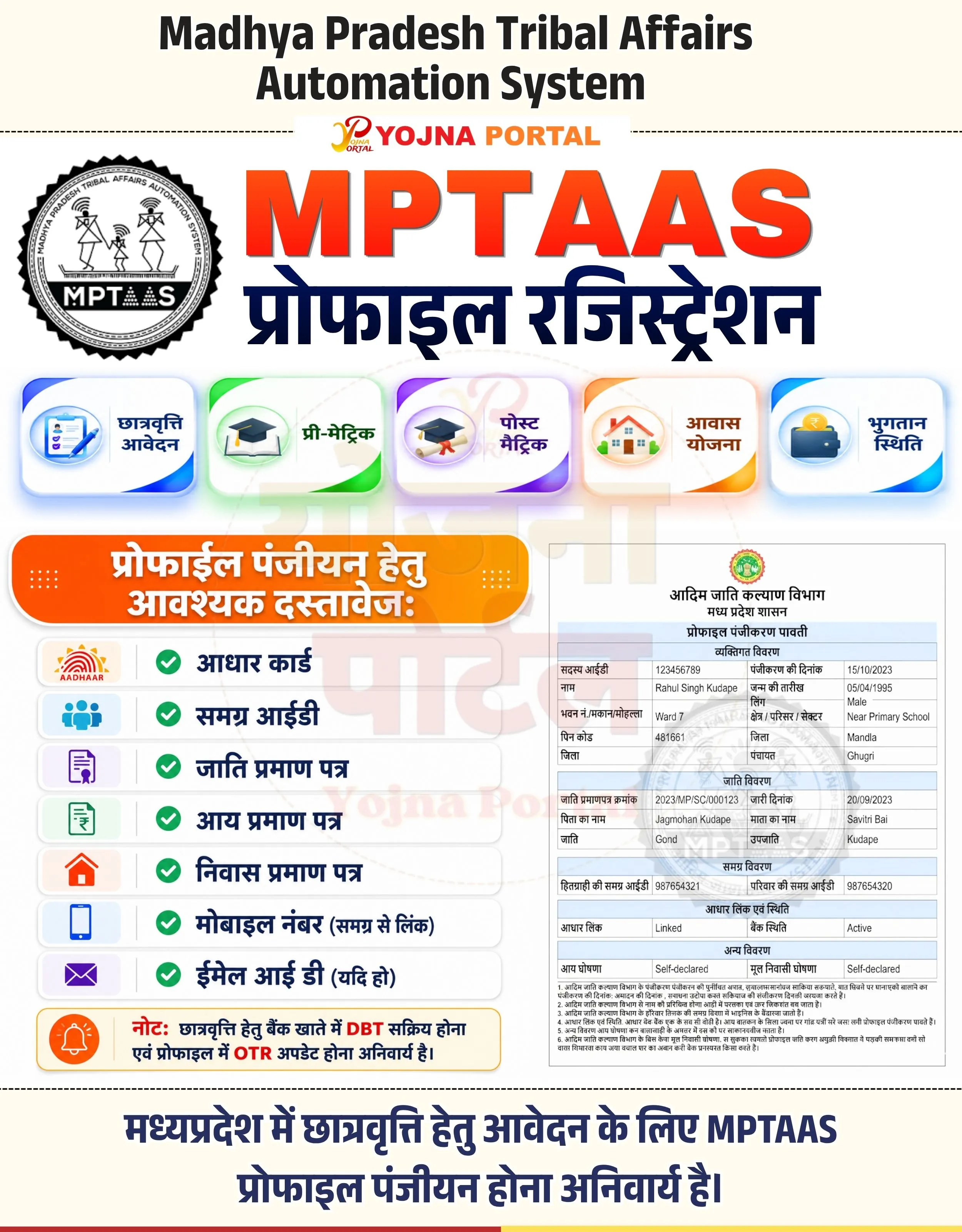
MPTAAS Profile Panjiyan Banner Related Poster Details
⚠️ Disclaimer: 🎯 This banner is created for educational and informational purposes only.
👉 All logos, names, and scheme-related information belong to their respective government departments and authorities.
📢 Short Sharing (Hindi)

🚨 MPTAAS प्रोफाइल रजिस्ट्रेशन शुरू
💰 छात्रवृत्ति हेतु DBT सक्रिय एवं OTR अपडेट अनिवार्य
📢 आवश्यक दस्तावेज तैयार रखें
👉 https://www.yojnaportal.com/profile/mptaas-profile-otr-update/
📢 Full Sharing (Hindi)
🚨 MPTAAS प्रोफाइल रजिस्ट्रेशन जानकारी

💰 मध्यप्रदेश में छात्रवृत्ति हेतु आवेदन के लिए MPTAAS प्रोफाइल पंजीयन अनिवार्य है।
📢 छात्रवृत्ति, प्री-मैट्रिक, पोस्ट-मैट्रिक, आवास योजना एवं भुगतान स्थिति जैसी सुविधाएं उपलब्ध।

📄 आवश्यक दस्तावेज:
✔ आधार कार्ड
✔ समग्र आईडी
✔ जाति प्रमाण पत्र
✔ आय प्रमाण पत्र
✔ निवास प्रमाण पत्र
✔ मोबाइल नंबर (समग्र से लिंक)
✔ ईमेल आईडी (यदि हो)

📢 महत्वपूर्ण सूचना:
✔ बैंक खाते में DBT सक्रिय होना चाहिए
✔ प्रोफाइल में OTR अपडेट होना अनिवार्य है

👉 अधिक जानें: https://www.yojnaportal.com/profile/mptaas-profile-otr-update/

#MPTAAS #Scholarship #MPScholarship #ProfileRegistration #YojnaPortal
Complete Your MPTAAS Profile for Scholarship Benefits
✨MPTAAS Profile Panjiyan Banner Key Highlights
- Scholarship profile registration for Madhya Pradesh students
- Pre-Matric and Post-Matric scholarship options available
- Required documents list for MPTAAS registration
- DBT activation and OTR update mandatory for scholarship
📌 Important Details of MPTAAS Profile Panjiyan Banner
- MPTAAS profile registration is mandatory for scholarship application
- Bank account must have DBT activated
- OTR should be updated in the student profile
- Documents like Aadhaar, Samagra ID, caste and income certificate are required
📖 About MPTAAS Profile Panjiyan Banner Poster
MPTAAS is the Madhya Pradesh Tribal Affairs Automation System used for scholarship registration and student profile management.
This banner provides scholarship categories, required documents, profile registration details, and important DBT-related instructions.
🧠 MPTAAS Profile Panjiyan Banner / Banner Generation Prompt
Create a highly detailed modern Indian government awareness poster in portrait format approximately 1000x1280 pixels with a soft light cream/off-white background and subtle paper texture. The overall design should look like a premium educational infographic banner created for a government scholarship awareness campaign.

TOP HEADER SECTION:
At the very top center place large bold black English typography:
“Madhya Pradesh Tribal Affairs
Automation System”

The font should be modern, thick, sans-serif, highly readable, and centered with strong vertical spacing.

Below this heading place a small centered logo text:
“YOJNA PORTAL”
with “Yojna” in red script style and “PORTAL” in orange bold uppercase.

MAIN TITLE SECTION:
Below the logo create a very large bold 3D-style red-orange gradient text:
“MPTAAS”
with glossy lighting effect, subtle shadow, and thick typography.

Directly below place massive bold Hindi text in dark navy blue:
“प्रोफाइल रजिस्ट्रेशन”
Use a clean modern Hindi font with strong weight and centered alignment.

LEFT LOGO SECTION:
On the left side below the title place a circular black-and-white official style MPTAAS seal/logo with tribal graphics inside. The logo should have thick circular borders and government seal appearance.

FEATURE CARDS SECTION:
Create a horizontal row of five premium rounded rectangular cards with soft shadows and glassmorphism effect.

Each card should include:
- Left-side colorful flat icon
- Hindi title text on right
- White glossy background
- Gradient corner accents
- Soft glow and shadow

Card 1:
Blue theme with scholarship form icon
Text:
“छात्रवृत्ति आवेदन”

Card 2:
Green theme with graduation cap icon
Text:
“प्री-मैट्रिक”

Card 3:
Purple theme with graduation scroll icon
Text:
“पोस्ट मैट्रिक”

Card 4:
Orange theme with house icon
Text:
“आवास योजना”

Card 5:
Blue theme with wallet/payment icon
Text:
“भुगतान स्थिति”

DOCUMENTS SECTION:
Below cards create a large orange-yellow gradient rounded header bar with glossy effect and white bold Hindi text:
“प्रोफाइल पंजीयन हेतु
आवश्यक दस्तावेज:”

Add small decorative dotted patterns on left and right sides of the header.

DOCUMENT LIST AREA:
Under the header create multiple horizontal white rounded cards stacked vertically with soft gray shadows.

Each row should contain:
- Left colored icon
- Green circular check icon
- Bold dark navy Hindi text

Rows:
1. Aadhaar logo icon
Text: “आधार कार्ड”

2. Blue people/group icon
Text: “समग्र आईडी”

3. Purple certificate icon
Text: “जाति प्रमाण पत्र”

4. Green income certificate icon
Text: “आय प्रमाण पत्र”

5. Orange home icon
Text: “निवास प्रमाण पत्र”

6. Blue mobile icon
Text: “मोबाइल नंबर (समग्र से लिंक)”

7. Purple email icon
Text: “ईमेल आई डी (यदि हो)”

NOTICE BOX:
At the bottom-left create a yellow-orange bordered rounded rectangular notice box.

Include orange notification bell icon on left.

Text inside:
“नोट: छात्रवृत्ति हेतु बैंक खाते में DBT सक्रिय होना
एवं प्रोफाइल में OTR अपडेट होना अनिवार्य है।”

Highlight “DBT” and “OTR” in red bold text.

RIGHT SIDE DOCUMENT PREVIEW:
On the right side place a realistic preview of an MPTAAS registration receipt document.

The document should resemble a scanned government PDF form with:
- Madhya Pradesh government logo at top
- Hindi government heading
- Blue table headers
- Gray table borders
- Multiple rows of registration details
- Faded watermark logo in center
- Official document layout

BOTTOM FOOTER TEXT:
At the bottom center add large bold dark blue Hindi text:
“मध्यप्रदेश में छात्रवृत्ति हेतु आवेदन के लिए MPTAAS
प्रोफाइल पंजीयन होना अनिवार्य है।”

Use large clean Hindi typography with centered alignment.

BOTTOM BORDER:
Add a thin decorative multicolor line strip at the very bottom edge.

DESIGN STYLE:
- Modern government infographic
- Premium clean UI
- White/cream background
- Soft shadows
- Glassmorphism cards
- Gradient highlights
- Professional CSC poster style
- Ultra sharp print-ready quality
- Balanced spacing and alignment
- Minimal clutter
- Government awareness campaign aesthetic

LIGHTING & EFFECTS:
Use soft realistic shadows, subtle glow around cards, premium gradients, smooth edges, and modern infographic composition with clean spacing.

The entire poster should look exactly like a professionally designed Hindi government scholarship registration awareness banner.
WhatsApp Telegram YouTube Facebook Instagram X (Twitter)