
MPESB Profile Registration Related Poster Details
यह पोस्टर केवल सामान्य जानकारी प्रदान करने के उद्देश्य से बनाया गया है।
हम यह सुनिश्चित नहीं करते कि ऊपर दी गई सभी जानकारी पूर्णतः सही, सटीक एवं समयानुसार अपडेट हो।
संबंधित विभाग समय-समय पर अपनी आधिकारिक वेबसाइट पर जानकारी में बदलाव कर सकते हैं।
यह वेबसाइट किसी भी सरकारी विभाग, बैंक, संस्था या संगठन की आधिकारिक वेबसाइट नहीं है।
सभी योजनाओं, लोगो, नाम एवं ट्रेडमार्क का अधिकार उनके संबंधित विभागों एवं संस्थाओं के पास सुरक्षित है।
किसी भी आवेदन, पंजीयन या सेवा का लाभ लेने से पहले संबंधित विभाग की आधिकारिक वेबसाइट या कार्यालय से जानकारी अवश्य सत्यापित करें।
📢 Short Sharing (Hindi)
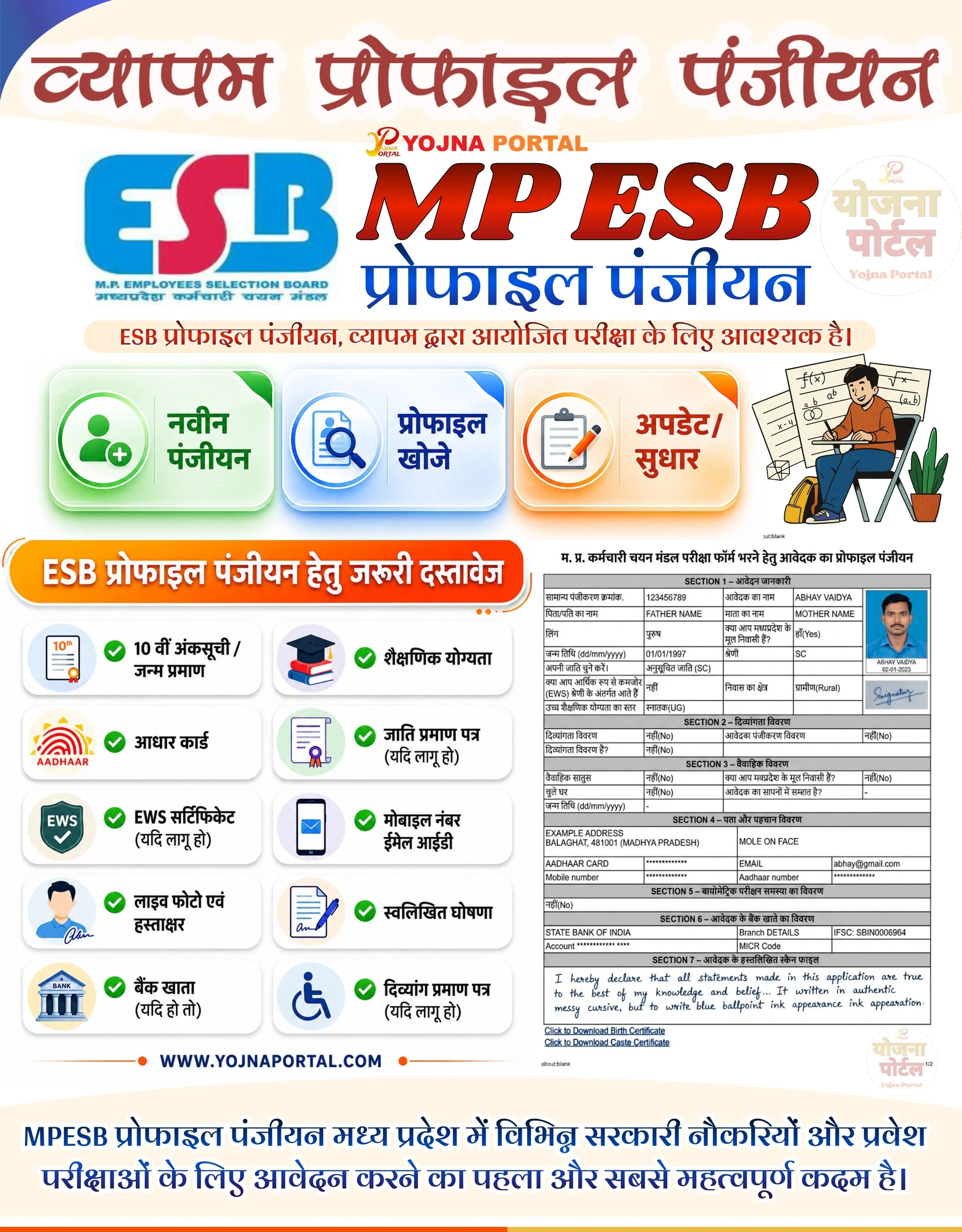
🚨 MP ESB प्रोफाइल पंजीयन शुरू
💰 नवीन पंजीयन, प्रोफाइल खोजे एवं सुधार सुविधा उपलब्ध
📢 जरूरी दस्तावेजों की पूरी जानकारी देखें
👉 www.yojnaportal.com
📢 Full Sharing (Hindi)
🚨 MP ESB प्रोफाइल पंजीयन

💰 मध्य प्रदेश कर्मचारी चयन मंडल (MPESB) द्वारा आयोजित परीक्षाओं हेतु प्रोफाइल पंजीयन अनिवार्य है।
📢 अब नवीन पंजीयन, प्रोफाइल खोजे एवं अपडेट/सुधार की सुविधा उपलब्ध।

📄 आवश्यक दस्तावेज:
✔ 10वीं अंकसूची / जन्म प्रमाण पत्र
✔ शैक्षिणिक योग्यता प्रमाण पत्र
✔ आधार कार्ड
✔ जाति प्रमाण पत्र (यदि लागू हो)
✔ EWS सर्टिफिकेट (यदि लागू हो)
✔ मोबाइल नंबर एवं ईमेल आईडी
✔ लाइव फोटो एवं हस्ताक्षर
✔ स्वलिखित घोषणा
✔ बैंक खाता विवरण
✔ दिव्यांग प्रमाण पत्र (यदि लागू हो)

👉 अधिक जानें: https://www.yojnaportal.com/profile/mpesb-candidate-profile-panjiyan/

#MPESB #ProfileRegistration #ESB #MPOnline #YojnaPortal
✨MPESB Profile Registration Key Highlights
- New profile registration facility available
- Search existing ESB profile quickly
- Update and correction option available
- List of required documents for registration included
📌 Important Details of MPESB Profile Registration
- 10th marksheet or birth certificate required
- Educational qualification documents mandatory
- Aadhaar card and mobile number required
- Live photo, signature and handwritten declaration needed
📖 About MPESB Profile Registration Poster
MPESB Profile Registration is mandatory for candidates applying for Madhya Pradesh government jobs and entrance examinations.
The banner explains registration services and important documents required for successful profile registration.
🧠 MPESB Profile Registration / Banner Generation Prompt
Create a highly detailed modern Indian government-style infographic poster in portrait format, approximately 1000x1280 resolution, with a clean cream-white background and premium educational/government banner layout.

BACKGROUND:
Use a soft light cream and white gradient background with subtle curved abstract shapes at the top and bottom. Add smooth modern UI styling with minimal shadows and soft glowing effects. Overall look should resemble a professional CSC / MP Online / Government awareness poster.

TOP HEADER SECTION:
At the top center place a large bold Hindi heading in dark maroon-red gradient serif font with soft white outline and shadow:
“व्यापम प्रोफाइल पंजीयन”

The typography should look bold, elegant, and government-poster style.

Below the title place a small “YOJNA PORTAL” logo text in orange-red gradient with tiny emblem icon above it.

MAIN CENTER SECTION:
Create a large ESB branding section.

LEFT SIDE:
Place a large official-style ESB logo in blue and pink colors with small Hindi subtitle text beneath:
“मध्यप्रदेश कर्मचारी चयन बोर्ड”

CENTER:
Large bold text:
“MP ESB”
Use glossy deep red gradient typography with black outline and subtle shadow.

Below it place huge blue Hindi text:
“प्रोफाइल पंजीयन”

RIGHT SIDE:
Add a faded circular “योजना पोर्टल” watermark logo in light beige and soft pink tones.

TAGLINE STRIP:
Below the main title section place a rounded cream/light-orange strip containing bold Hindi text:
“ESB प्रोफाइल पंजीयन, व्यापम द्वारा आयोजित परीक्षा के लिए आवश्यक है।”

MIDDLE ACTION CARDS SECTION:
Create three premium horizontal glassmorphism cards side-by-side with equal spacing and realistic soft shadows.

CARD 1:
Green gradient card with glowing edges.
Left icon: user registration/add profile icon in circular frame.
Text:
“नवीन पंजीयन”

CARD 2:
Blue gradient card with glass effect.
Left icon: profile search/document magnifier icon.
Text:
“प्रोफाइल खोजे”

CARD 3:
Orange gradient card with glowing edge.
Left icon: clipboard/edit/update icon.
Text:
“अपडेट/सुधार”

All cards should have:
- smooth rounded corners
- premium modern UI
- soft reflections
- subtle glow beneath cards
- clean typography

RIGHT SIDE ILLUSTRATION:
Place a modern flat illustration of a young student sitting on a chair studying or filling forms, with educational sheets and formulas in the background, plus a small green plant near the chair.

DOCUMENTS SECTION:
Below the action cards create a large orange-red rounded heading banner with white border glow and bold Hindi text:
“ESB प्रोफाइल पंजीयन हेतु जरूरी दस्तावेज”

Below this heading create a 2-column grid of premium white rounded cards with soft shadows.

Each card must contain:
- circular icon on left
- green checkmark
- bold Hindi text

Include these exact items:

1.
Icon: marksheet/certificate
Text:
“10 वीं अंकसूची /
जन्म प्रमाण”

2.
Icon: graduation cap/books
Text:
“शैक्षिणिक योग्यता”

3.
Icon: Aadhaar logo
Text:
“आधार कार्ड”

4.
Icon: certificate/document
Text:
“जाति प्रमाण पत्र
(यदि लागू हो)”

5.
Icon: EWS shield
Text:
“EWS सर्टिफिकेट
(यदि लागू हो)”

6.
Icon: smartphone/email
Text:
“मोबाइल नंबर
ईमेल आईडी”

7.
Icon: user photo/signature
Text:
“लाइव फोटो एवं
हस्ताक्षर”

8.
Icon: handwritten declaration paper
Text:
“स्वलिखित घोषणा”

9.
Icon: bank building
Text:
“बैंक खाता
(यदि हो तो)”

10.
Icon: disability wheelchair
Text:
“दिव्यांग प्रमाण पत्र
(यदि लागू हो)”

FORM PREVIEW SECTION:
On the lower-right side place a miniature preview of an official MP ESB registration form screenshot containing:
- table layout
- applicant photo
- signature
- handwritten declaration
- scanned document style

The preview should resemble a real government registration form screenshot.

FOOTER SECTION:
At bottom center add:
“WWW.YOJNAPORTAL.COM”
Use dark blue bold modern font with small orange divider dots on both sides.

BOTTOM DESCRIPTION:
Add a large bold blue Hindi paragraph centered:
“MPESB प्रोफाइल पंजीयन मध्य प्रदेश में विभिन्न सरकारी नौकरियों और प्रवेश परीक्षाओं के लिए आवेदन करने का पहला और सबसे महत्वपूर्ण कदम है।”

TYPOGRAPHY & STYLE:
- Mix of modern Hindi typography and government awareness poster style
- Premium infographic composition
- Ultra-clean spacing
- Soft shadows and glow
- High readability
- Professional CSC / MP Online advertisement aesthetic

COLOR PALETTE:
- Cream white background
- Orange-red gradients
- Deep blue typography
- Green, blue, and orange glassmorphism cards
- Soft pastel accents

LIGHTING:
Flat infographic lighting with subtle ambient glow and realistic UI shadows.

OVERALL LOOK:
The final output should look exactly like a professionally designed Indian government awareness infographic banner for MP ESB profile registration and required documents, combining educational branding, modern UI cards, official form preview, and structured document checklist layout.
WhatsApp Telegram YouTube Facebook Instagram X (Twitter)