
Bank Statement Print Service Related Poster Details
यह पोस्टर केवल सामान्य जानकारी प्रदान करने के उद्देश्य से बनाया गया है।
हम यह सुनिश्चित नहीं करते कि ऊपर दी गई सभी जानकारी पूर्णतः सही, सटीक एवं समयानुसार अपडेट हो।
संबंधित विभाग समय-समय पर अपनी आधिकारिक वेबसाइट पर जानकारी में बदलाव कर सकते हैं।
यह वेबसाइट किसी भी सरकारी विभाग, बैंक, संस्था या संगठन की आधिकारिक वेबसाइट नहीं है।
सभी योजनाओं, लोगो, नाम एवं ट्रेडमार्क का अधिकार उनके संबंधित विभागों एवं संस्थाओं के पास सुरक्षित है।
किसी भी आवेदन, पंजीयन या सेवा का लाभ लेने से पहले संबंधित विभाग की आधिकारिक वेबसाइट या कार्यालय से जानकारी अवश्य सत्यापित करें।
📢 Short Sharing (Hindi)
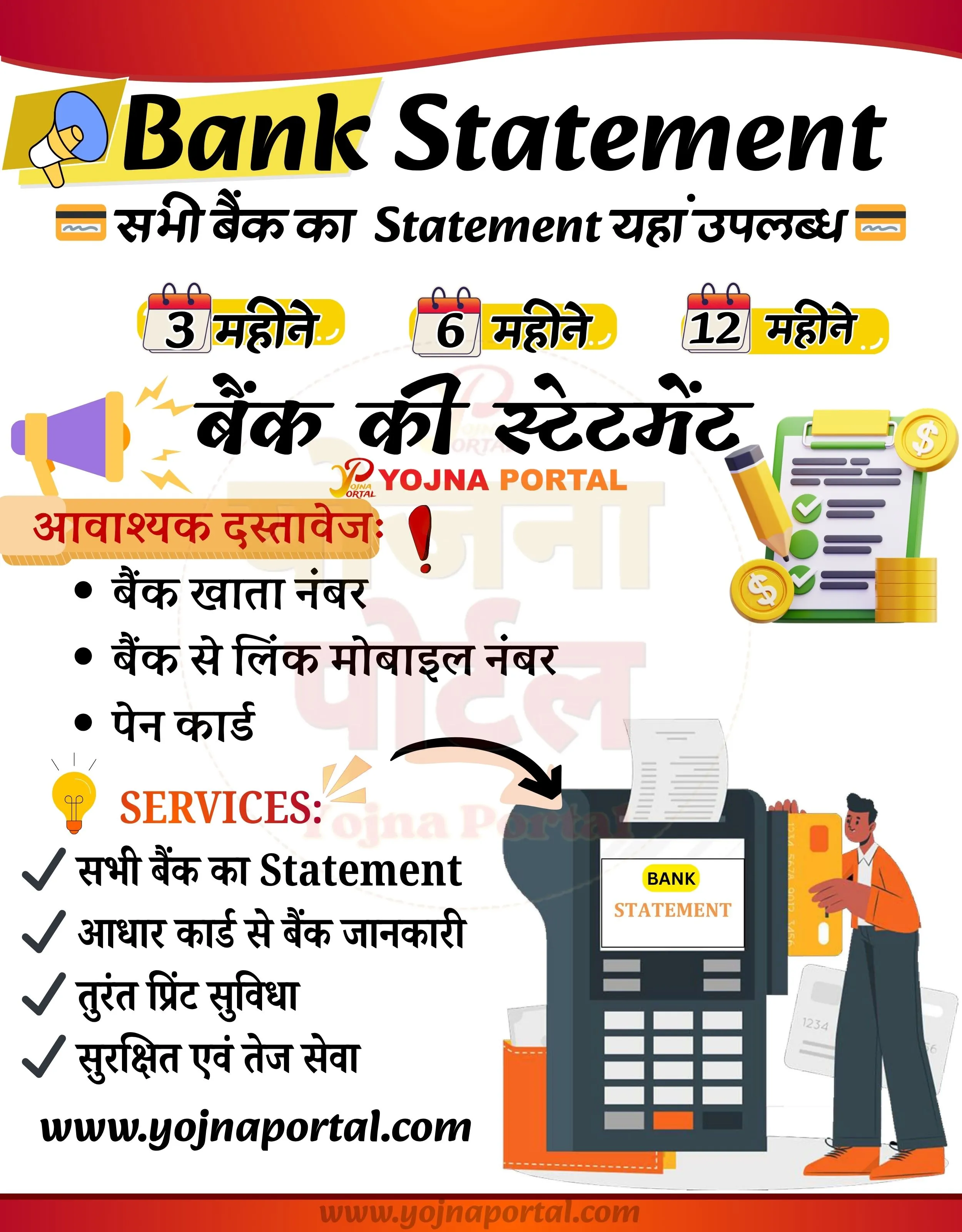
🚨 बैंक स्टेटमेंट अब आसान!
💰 3, 6, 12 महीने का स्टेटमेंट प्राप्त करें
📢 सभी बैंकों की सुविधा उपलब्ध
👉 www.yojnaportal.com
📢 Full Sharing (Hindi)
🚨 बैंक स्टेटमेंट सेवा उपलब्ध

💰 अब 3, 6 और 12 महीने का बैंक स्टेटमेंट आसानी से प्राप्त करें
📢 सभी बैंकों का स्टेटमेंट एक ही स्थान पर उपलब्ध

📄 आवश्यक दस्तावेज:
✔ बैंक खाता नंबर
✔ बैंक से लिंक मोबाइल नंबर
✔ पैन कार्ड
✔ तुरंत प्रिंट सुविधा

👉 अभी आवेदन करें: www.yojnaportal.com

#BankStatement #YojnaPortal #OnlineService
✨Bank Statement Print Service Key Highlights
- Bank statements available for all banks
- Get statements for 3, 6, or 12 months duration
- Aadhaar-based bank information access
- Instant print facility available
📌 Important Details of Bank Statement Print Service
- Bank account number required
- Mobile number linked with bank account required
- PAN card required
- Service available for all major banks
📖 About Bank Statement Print Service Poster
This poster provides information about bank statement services available through Yojna Portal.
Users can easily obtain their bank statements for different durations with minimal documents and quick processing.
🧠 Bank Statement Print Service / Banner Generation Prompt
Create a vertical government-style promotional banner (approx. 1000x1280 px) with a clean, modern layout and a soft light grey background. Add a curved red-to-orange gradient header at the very top with smooth wave edges.

TOP SECTION:

On the left side, place a yellow slanted rectangular label with a megaphone icon.
Next to it, prominently display the main English title “Bank Statement” in large, bold, black modern font (slightly rounded, friendly सरकारी style).
Below the title, add a supporting Hindi + English mixed line:
“सभी बैंकों का Statement यहां उपलब्ध”
Include small bank/passbook style icons on both sides of this line.
Below this, place three horizontally aligned small calendar-style icons with labels:
“3 महीने”, “6 महीने”, “12 महीने”
Each inside a yellow pill-shaped highlight background.

MIDDLE SECTION:

Center a large bold Hindi heading: “बैंक की स्टेटमेंट”
Directly below, place the text “YOJNA PORTAL” in uppercase, orange color, slightly smaller font.
Add a megaphone illustration on the left side emitting attention lines.
On the right side, include a checklist/clipboard illustration with a pencil and coin icons.

LEFT CONTENT BLOCK:

Add a red highlighted heading: “आवश्यक दस्तावेज:” followed by a red exclamation icon.
Below it, create a bullet list in Hindi:
• बैंक खाता नंबर
• बैंक से लिंक मोबाइल नंबर
• पेन कार्ड

SERVICES SECTION:

Add a small yellow light bulb icon next to the heading “SERVICES:” in bold orange font.
Below, list items with checkmark icons:
✔ सभी बैंक का Statement
✔ आधार कार्ड से बैंक जानकारी
✔ तुरंत प्रिंट सुविधा
✔ सुरक्षित एवं तेज सेवा

RIGHT ILLUSTRATION:

Place a large ATM machine illustration slightly to the right bottom area.
The ATM screen should display “BANK STATEMENT”.
A paper receipt should be coming out of the ATM.
Next to it, include a human illustration (modern flat style) holding a card.

BOTTOM SECTION:

Add the website URL “www.yojnaportal.com”
 in bold black font aligned towards bottom-left.
At the very bottom, include a thin red-orange gradient strip similar to the header.

STYLE & DESIGN:

Use flat vector illustrations with soft shadows.
Maintain proper spacing, balanced layout (left text + right illustration).
Use a combination of black, orange, red, and yellow color palette.
Fonts should be bold, clear, and government poster style (Hindi + English mix).
Ensure all text is sharp and readable, with proper alignment and hierarchy.
Keep overall design clean, informative, and visually engaging without clutter.
WhatsApp Telegram YouTube Facebook Instagram X (Twitter)